RevitSync
2025-2026
C# Revit add-in, ASP.NET Core API, and a React/Three.js viewer that stay in sync.
- C#
- ASP.NET Core
- React
- Three.js
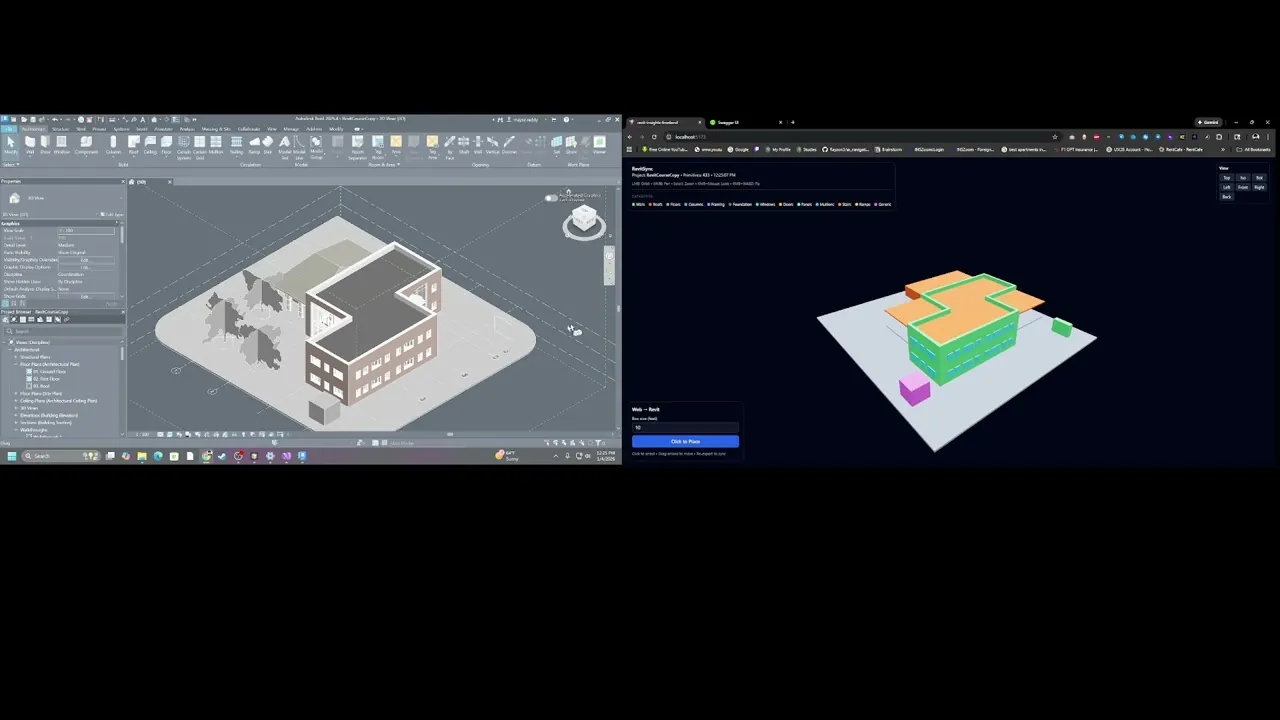
Revit posts a bounding-box snapshot to a local ASP.NET Core API. A React / Three.js page polls that API and draws the same elements. Clicks in the browser enqueue commands. The add-in polls the queue and applies them on Revit’s UI thread.
Personal project. Unofficial, not Autodesk work. Three processes on one machine.
Revit add-in          ASP.NET Core API           Browser
Export / DocumentChanged
  POST /api/geometry  →  in-memory snapshot  →  GET /api/geometry/latest
Click / drag / delete
  GET /api/commands   ←  in-memory queue     ←  POST /api/commands
What it does
Revit to web:
- World-axis bounding boxes from 13 categories in the active view.
DocumentChangeddebounce, then anExternalEventre-export.- Selection ids ride on the next snapshot. The viewer outlines them.
Web to Revit:
ADD_BOXEScreates taggedDirectShapeboxes.MOVE_ELEMENT/DELETE_ELEMENTSapply only to those tagged DirectShapes.SELECT_ELEMENTSsets selection and zooms. No transaction.
Move and delete from the web do not apply to ordinary Revit walls, floors, or families.
What I built
- C# / .NET Framework 4.8 Revit 2026 add-in.
- ASP.NET Core 9 API with in-memory snapshot and command queue.
- React / TypeScript / Three.js viewer with ETag / If-None-Match polling.
Limits
- Geometry is axis-aligned bounding boxes, not meshes.
- Snapshot and command queue live in process memory.
- No auth, no TLS, no multi-user, no conflict resolution.
- Polling, not WebSockets.
- Add-in targets .NET Framework 4.8 while Autodesk’s official Revit 2025/2026 add-in target is .NET 8.